
Consumer Research Platform
Seven tools. One front door.
ICLS unified a fragmented consumer-research estate behind a single entry point — an answer engine over historical studies, five capability groups organised by intent, and a governed request-to-approval workflow with spend visible in one view.
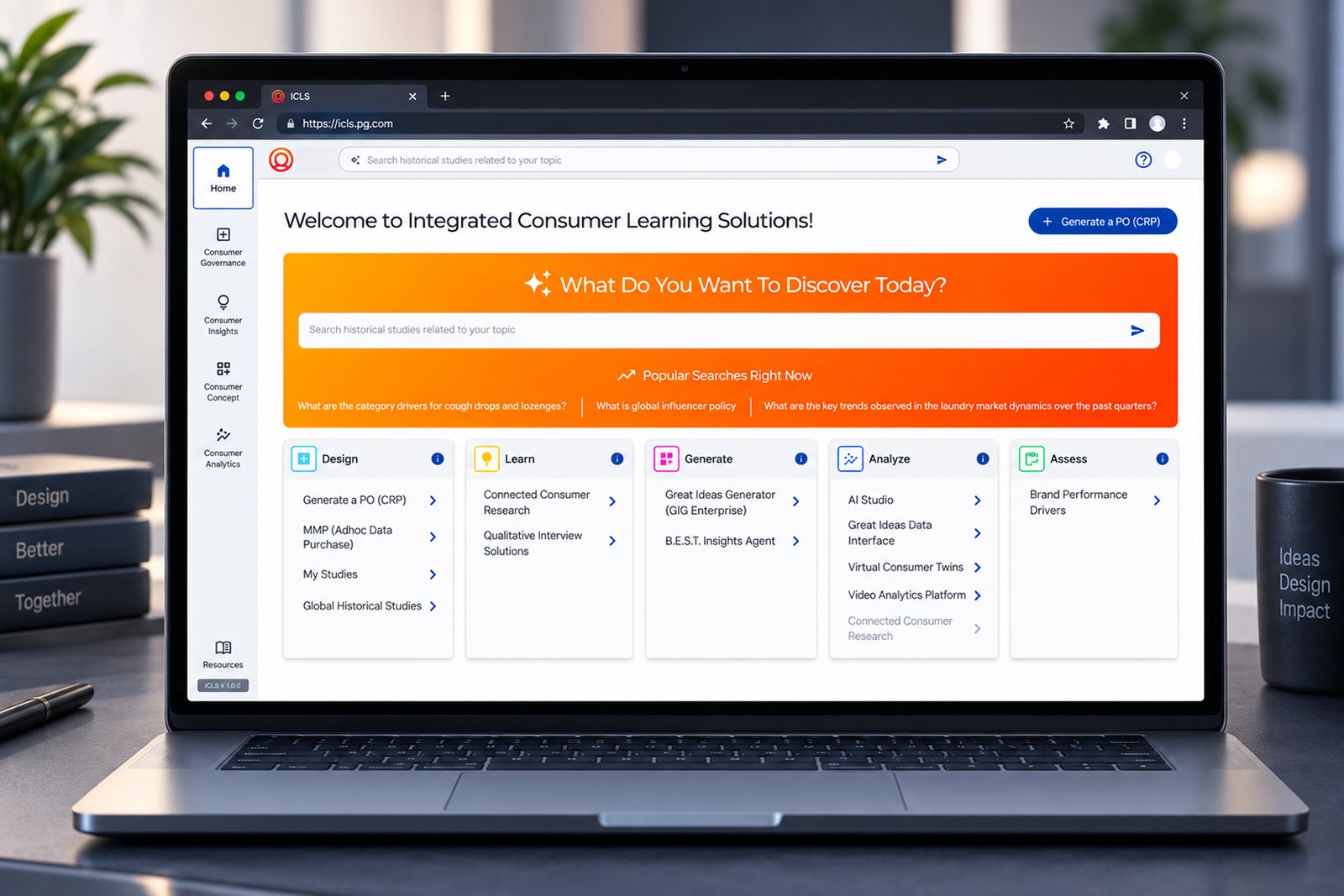
The answer engine sits above the fold, framed as a question rather than a search box. Below it, five capability cards route to every tool in the estate.
Tools usedSeven specialist tools, and no front door
Consumer research ran across seven disconnected specialist tools. Researchers memorised where each one lived, approvals were tracked in email threads, and completed studies were archived somewhere unsearchable — so the same research was commissioned twice.
- 01Fragmented estate
Seven tools with separate entry points, separate logins and no shared vocabulary between them.
- 02Approvals lived in email
Status existed only in someone's inbox. "Where is my study?" had no authoritative answer.
- 03Past research was invisible
Completed studies were archived but not searchable, so prior work was rarely reused.
This looked like a UI brief and was really an information architecture and governance brief. The decisions that mattered were structural, not visual.
Five roles, one contested workflow
| User | Primary goal |
|---|---|
| Study Owner / Researcher | Design and execute a study without relearning the tool estate |
| Approving Manager | Review and sign off study design on a defensible basis |
| Finance Approver | Validate budget before commitment |
| Portfolio Admin | Oversee the portfolio and report fiscal-year spend |
| Lead Supplier | Receive scope and deliver against agreed terms |
- 01Onboarding took weeks
New researchers learned tool locations by asking colleagues, not by using the product.
- 02"Where is my study?"
The single most-asked question in the estate — and the one nothing could answer.
- 0320+ governed fields
The PO request carried more than twenty fields, each with its own compliance rule.
- 04Search intent was conversational
People asked questions in sentences, not keywords, and expected an answer.
- 05Compliance arrived too late
AI, IT and legal declarations surfaced after commitment, forcing rework.
- 06Finance needed one number
Portfolio owners wanted a single fiscal-year spend figure, self-serve.
Organise by intent, not by inventory
- Intent beats inventory
Users do not think "which tool" — they think "I need to learn something". Grouping by intent made seven tools legible as five capabilities.
- Search is the homepage
If the top question is conversational, the answer engine belongs above the fold, framed as a question rather than a search box.
- Status is an object
Approval stage deserved to be a first-class entity with a named owner and a timestamp — not a line in an email.
- Governance belongs in flow
Compliance declarations captured inside the request, with inline guidance, prevent rework after commitment.
Enterprise realities that shaped the design
| Constraint | Design response |
|---|---|
| Seven tools could not be rebuilt | A federated portal that routes to existing tools rather than replacing them |
| Governed multi-party approvals | A five-stage stepper with named owners at every transition |
| Global participating markets | Amounts carried in both local currency and USD |
| AI, IT and legal compliance | Declarations captured upfront inside the request flow |
| Very long request forms | Sectioned into General and Key Information, with save-as-draft |
| Fiscal-year finance reporting | Portfolio view with fiscal-year switch and Excel export |
Architecture was the design
The portal federates an existing estate. Three core objects carry the model, and every module in the portal resolves back to one of them.
Home
Answer engineCapability hubFirst-login tourConsumer Governance
Generate a PO (CRP)MMP purchaseMy StudiesApprovalsConsumer Insights
Global historical studiesStudy recordsConsumer Concept
Concept generationConcept testingConsumer Analytics
Analysis toolsAssessmentResources
GuidanceSpend reportingDIY concierge| Intent | What sits beneath it |
|---|---|
| Design | Generate a PO (CRP), MMP purchase, My Studies, Global Historical Studies |
| Learn | Historical research retrieval and guided study selection |
| Generate | Concept generation and creative development tools |
| Analyze | Analytics and data interpretation capabilities |
| Assess | Validation, testing and assessment tooling |
The IA tree was the artefact that got seven tool owners to agree. It unblocked the build more than any screen did.
Discover, request, approve
Three flows carry the platform. The first prevents duplicate research, the second governs commissioning, the third makes status self-evident.
Discovery flow- 01Ask
Natural-language question, not keywords.
- 02Retrieve
Matching historical studies surface.
- 03Evaluate
Scope, method, markets, deliverables.
- 04Decide
Reuse existing or commission new.
- 05Route
Hand off to the right capability.
- 01Define
Title, owner, organisation, function.
- 02Scope
Category, technique, methodology, markets.
- 03Declare
Supplier, IT, AI and legal compliance.
- 04Justify
Purpose, success criteria, background.
- 05Submit
Save as draft or commit the study.
- 01Planned
Study created and scoped.
- 02Design Approval
Manager signs off on method.
- 03Financial Approval
Finance validates the budget.
- 04Execution
Supplier delivers against scope.
- 05Completed
Deliverables filed and searchable.
Every transition records step, date, status and owner — so the audit trail builds itself rather than being reconstructed later.
Three roles, three definitions of done
Each map compares actions, needs and the corresponding design response across one commissioning cycle.
Four rules that settled every argument
- 01Intent before inventory
Group by what a person is trying to do, never by which team owns the tool.
- 02Status is always visible
Every study shows its stage and its current owner without anyone having to ask.
- 03Governance in the flow
Compliance is captured where the work happens, not bolted on after commitment.
- 04Reuse before commission
Show what already exists before offering to spend money on something new.
A process made visible at every gate
- 01Research
- 02IA Tree
- 03User Flows
- 04Wireframes
- 05Visual Design
- 06Prototype
- 07Testing
- 08Handoff
| Insight | Design decision | Where it landed |
|---|---|---|
| People think in intent | Five capability groups above the tool estate | Capability hub |
| Search intent is conversational | Answer engine with popular-search prompts | Discovery home |
| "Where is my study?" dominates | Five-stage stepper as a first-class object | Study record |
| Compliance arrives too late | AI, IT and legal declarations inside the request | Generate a PO (CRP) |
| Long forms get abandoned | Sectioned layout with save-as-draft | CRP form |
| Finance needs one number | Fiscal-year total with filters and export | My Studies |
A 20-field form that people finish
The governed request was the densest surface in the product. Legibility was solved at three levels.
- FORMSectioned disclosure
General Study Information and Key Information split a 20-field request into two readable passes.
- PORTFOLIOStatus as colour
Nine colour-coded work statuses make the exceptions in a long table visible before it is read.
- PROGRESSFractions, not flags
PO upload renders as a progress fraction, so partial completion is legible at a glance.
| Pattern | Why it exists |
|---|---|
| Governed pickers | Category, technique, methodology and markets come from centrally maintained lists, so data stays comparable across the portfolio |
| Inline guidance | Each declaration carries its rule beside the field, removing the need to consult a separate policy document |
| Dual currency | Amounts render in local currency and USD together, so global markets and finance read the same record |
What changed once researchers used it
The long request form was abandoned midway when a researcher had to go and find a supplier detail.
Save as Draft, with drafts surfaced in My Studies so an unfinished request is never lost.
A keyword search box returned nothing useful, because people typed whole questions.
An answer engine framed as a question, with popular-search prompts to teach the interaction.
Compliance declarations were misread, causing requests to be returned after financial commitment.
Guidance authored inline beside every AI, IT and legal declaration at the point of answering.
Approvers could not tell whether a delay was theirs or somebody else's.
Approval history recording step, date, status and assignee for every transition.
Built on the client design system
ICLS was composed from the client's existing enterprise component library, extended only where the governance workflow demanded new patterns.
Components extended- Approval stepper
A five-stage horizontal stepper carrying stage name, owner and timestamp — reused on every study record.
- Governed field group
A picker paired with inline guidance, used for every centrally maintained taxonomy field.
- Portfolio table
Column filters, nine status colours, progress fractions, refresh and Excel export in one dense surface.
The value was consistency of meaning — a status colour means the same thing on the home hub, the portfolio table and the study record.
The platform in use
Discovery Home
The answer engine sits above the fold, framed as a question rather than a search box. Below it, five capability cards route to every tool in the estate.
- Natural-language retrieval over historical studies
- Popular-search prompts that teach the interaction
- Five intent groups: Design, Learn, Generate, Analyze, Assess
- Corporate SSO with a first-login tour
- One number, one year
Fiscal-year total planned amount sits above the table, with a year switch beside it.
- Every study, one row
Owner, type, spend and work status across nine colour-coded states.
- Progress, not flags
PO upload renders as a fraction, so partial completion is readable at a glance.
- Self-serve reporting
Column filters, refresh and Excel export remove finance's dependency on a request.
- Five-stage stepper
Planned → Design → Financial → Execution → Completed, answering "where is my study?" on sight.
- Details panel
Owner, dates and amounts in both local currency and USD, with sub-records one tab away.
- Supplier and history
Lead supplier name and contact, plus approval history by step, date, status and assignee.
- Documents
The latest CRP document with copy-link and download.
| Module | Capability |
|---|---|
| Answer Engine | Natural-language retrieval across historical studies with popular-search prompts |
| Capability Hub | Five intent groups routing to every tool, with inline guidance |
| Generate a PO (CRP) | Governed study request: scope, method, markets, supplier and compliance declarations |
| MMP | Adhoc data purchase path without raising a full study |
| My Studies | Portfolio and drafts, fiscal-year spend, filters and Excel export |
| Study Record | Approval stepper, budget, proof of performance, proposal, markets and files |
| Global Historical Studies | Searchable cross-market archive of completed research |
| Resources | Guidance, spend reporting and the DIY research concierge |
What it added up to
Platform outcomes- 7 → 1
Fragmented tools unified behind a single front door
- $800MM
Fiscal-year research spend visible in one view
- 5
Approval stages, transparent with named owners
The spend figure is the fiscal-year total planned amount surfaced by the portfolio view.
Business outcomes- Closed the discovery gap
Historical research became searchable in natural language, so prior work is reused rather than re-commissioned.
- Made the approval chain visible
Sign-off moved from email threads to a visible queue with named owners and timestamps.
- Embedded compliance
AI, IT and legal declarations are captured upfront, removing rework after financial commitment.
- Gave finance self-serve reporting
Fiscal-year committed spend is available on demand, without raising a reporting request.
Architecture was the design
This project looked like a UI brief and was really an information architecture and governance brief. The decisions that mattered most were structural: naming groups by intent, treating status as an object, and putting compliance inside the flow. None of them are visible as a component, and all of them are why the platform works.
-
What I learned
Unifying an estate is a diplomacy problem before it is a design problem. The IA tree was the artefact that got seven tool owners to agree, and it unblocked the build more than any screen did.
-
What I would improve today
A personalised home based on role and study history, predictive approval-time estimates, AI-assisted form completion from prior studies, and a dedicated WCAG 2.1 AA pass on the dense portfolio table.